All work
Office live · website and articles rolling out

RGMS, moved off a rented platform and onto a system they own.

RGMS is a garden maintenance and landscaping firm in Manchester. They came to Sitework from BUILT for Trades and left with five things built around how they actually work: a new website, a quote form people enjoy finishing, their own office app, an SEO system that publishes every week, and a Google profile that finally says what they do.

rgms.uk · new homepage
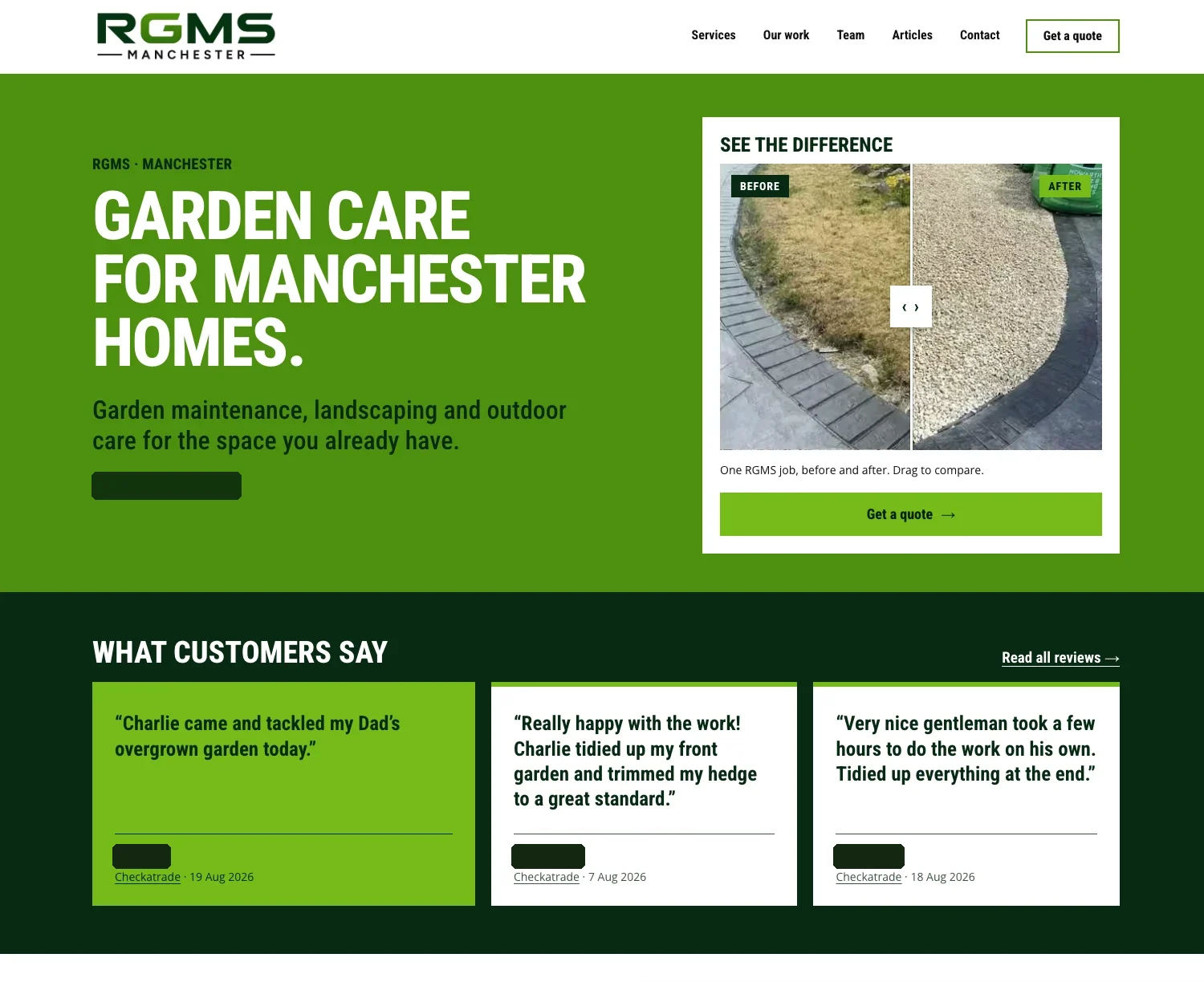
The new RGMS homepage: a bold green hero, a before and after slider of a gravel job, and three customer reviews.
Client
RGMS, Manchester
Trade
Gardening and landscaping
Plan
Growth, plus a custom office app
Came from
BUILT for Trades

Customer names, addresses, locations, reviewer names and contact details are covered in every screenshot on this page. Nobody's private details are shown.

The brief behind the brief.

RGMS first got in touch about Google Maps. Within a week the question had become bigger: could they leave their platform altogether without losing a single customer, job, invoice or page Google already knew?

Their old setup bundled the website, the job app and the search work together, and the design and the system belonged to the provider. That kind of setup works until you want to change something, or leave. The aim here was the opposite: everything RGMS uses should be theirs, built around a gardener's week rather than a generic trade template, with one person on the end of the phone who built all of it.

Nothing lost

Every customer, job, quote, invoice and diary visit moved across. Every web address Google had indexed still works.

Nothing retyped

The old platform's data export went straight into the new system. Invoice numbers carry on from where they stopped.

Nothing rented

The website is RGMS's from day one. If they ever leave, their data is exported for them automatically.

The build

Five parts, one system.

Each part feeds the next. The website wins the visit, the quote form turns it into an enquiry, the Office turns the enquiry into a job and an invoice, and the SEO system and Google profile keep new visits coming.

01

The website

A full rebuild of all 46 pages, designed around RGMS's own work rather than stock photos of someone else's garden.

  • Every address kept. The old site was mirrored page by page and checked against the live one the way Google reads it, so no ranking was thrown away in the move.
  • Their own photos, safely. Hundreds of real job photos were catalogued, renamed for search and stripped of hidden location data before any went online.
  • Before and after, everywhere it sells. Drag-to-compare sliders on the homepage and service pages, from real RGMS jobs.
  • A look of their own. A mowed-lawn stripe motif, a heavy condensed headline face and RGMS's own green, so it reads as a gardener's site, not a template.
  • Old faults fixed. Page titles and canonical tags that sat in the wrong place, and dead pages Google still listed, are cleaned up in the rebuild.
rgms.uk
RGMS homepage with a before and after slider and three Checkatrade reviews, reviewer names covered.
The homepage hero. Reviews come from real customers; their names are covered here.
02

The quote form people finish

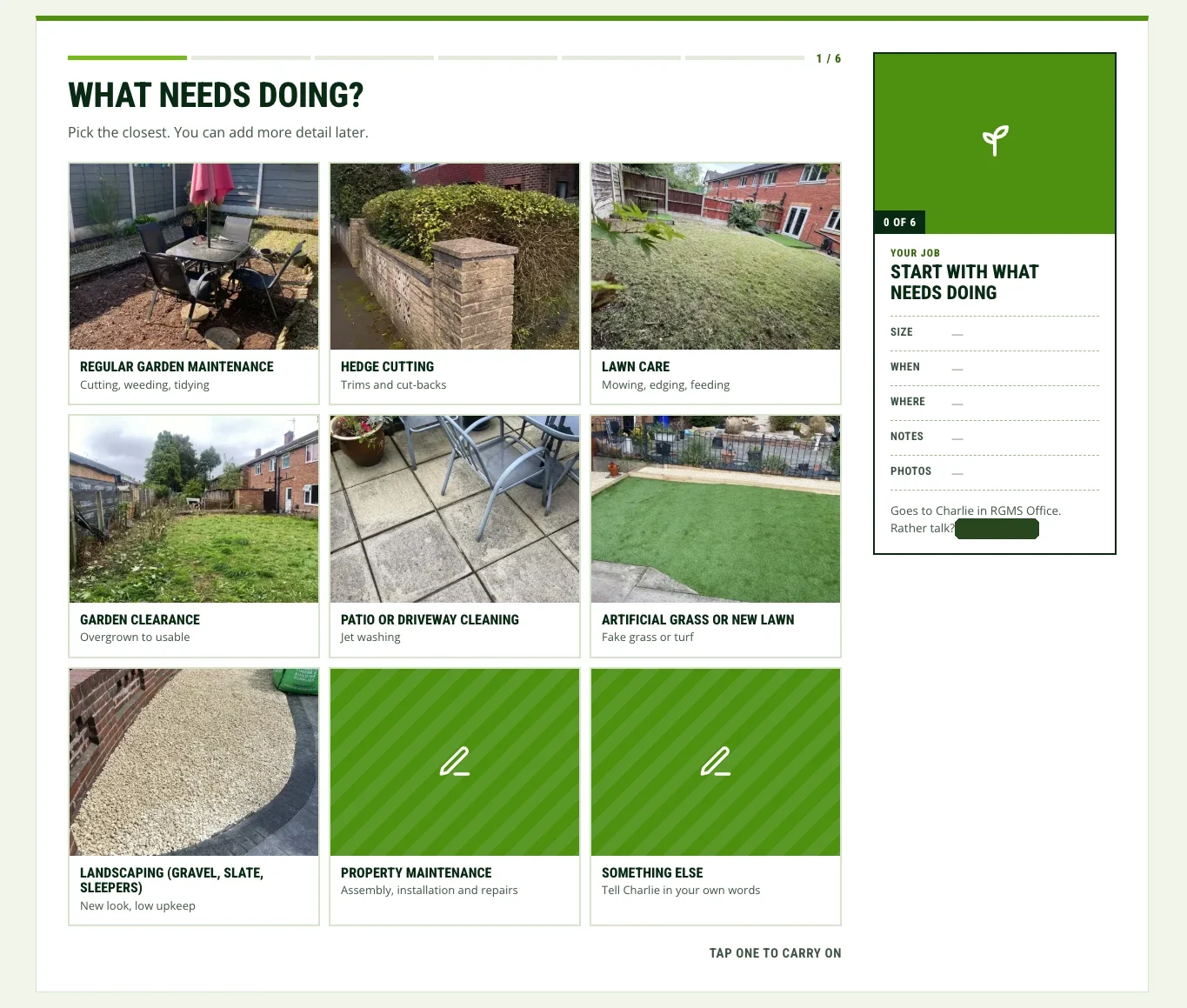
Most contact forms ask for everything at once and lose people halfway. This one asks one question per screen, and builds the job summary beside it as you go.

  • Pictures, not paperwork. The first question is nine photo tiles from RGMS's own jobs. One tap and you're moving.
  • The card fills itself in. Size, when, where, notes and photos tick off on the job card as each answer lands. Watching it complete is the reason people keep going.
  • Six small steps. A progress bar shows exactly how far there is to go, so nobody bails at a wall of fields.
  • Straight to RGMS. The finished enquiry lands in RGMS Office with the customer's photos attached, and the phone number is always on screen for anyone who would rather call.
rgms.uk · get a quote
Step one of six of the RGMS quote form: nine photo tiles for services, with a job summary card on the right waiting to be filled in.
Step 1 of 6. The job card on the right builds itself as the customer answers.
03

RGMS Office

A business app built for RGMS, with their name on it, that replaced the job system on the old platform. It runs on a phone in the van, an iPad or a desktop, and lives at RGMS's own web address.

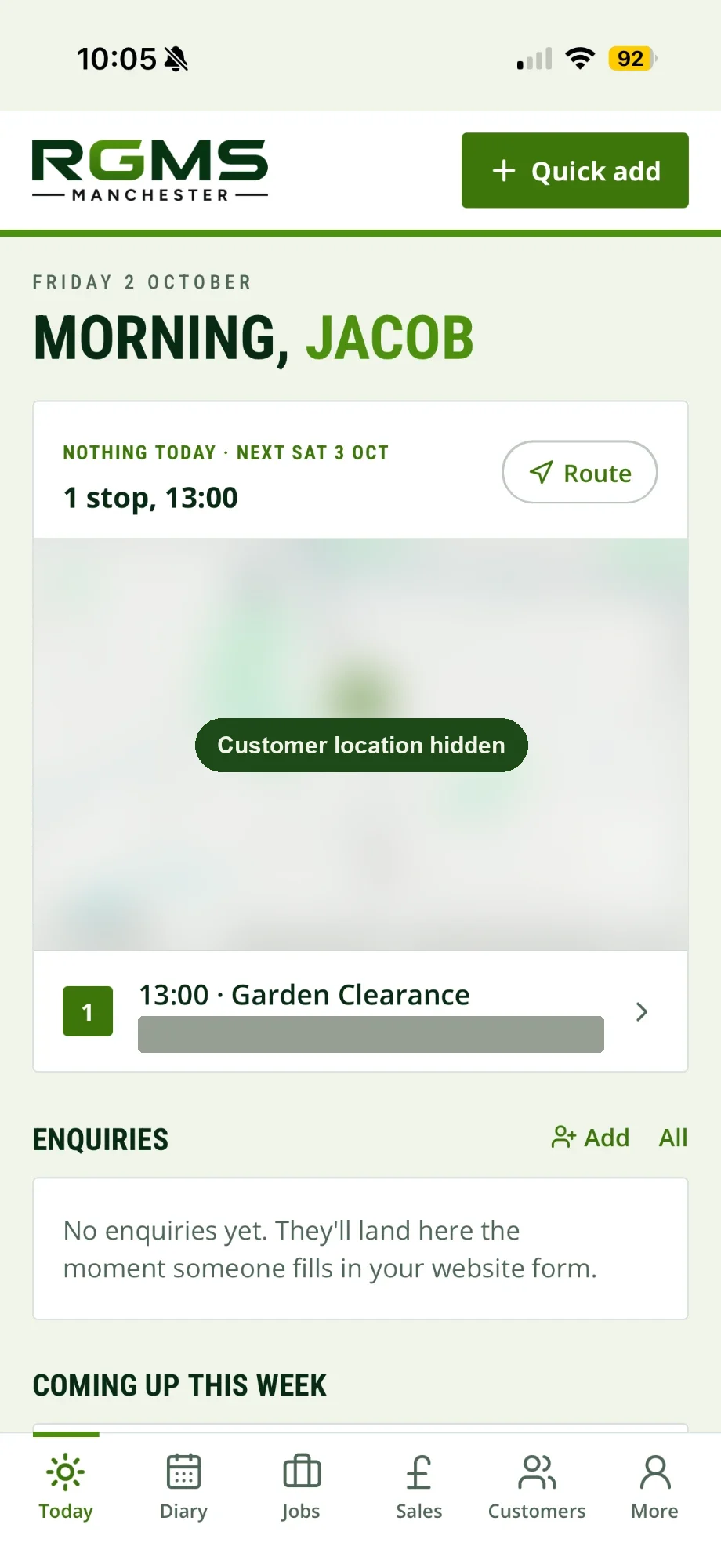
Opening screen: today's stops on a map, one tap to route, new enquiries and the rest of the week.

RGMS Office Today screen on a phone: the next stop at 13:00, a garden clearance, with the customer's name, address and map location covered.
The Today screen. The customer's name, address and map are covered.
  • TodayThe day's visits on a map in order, with one-tap directions, plus what's coming up this week.
  • EnquiriesWebsite enquiries land instantly with the customer's photos, and a notification goes to the phone. Where it can be detected, it shows where the enquiry came from.
  • Quick addA customer, job, quote or visit from any screen, in a few taps, standing in someone's garden.
  • DiaryA rolling year of bookings, with repeat visits for regular maintenance customers set once and filled in automatically.
  • JobsEvery job with its notes, visits and photos in one place, from first enquiry to paid.
  • QuotesBuilt from a saved price list and ready-made templates. Sent as a link the customer opens without logging in, and accepts with one button.
  • InvoicesClean PDF invoices with the business details set once. Customers pay RGMS directly, so nobody takes a cut.
  • SalesEvery estimate, quote and invoice in one list, with what's owed and what's waiting on a customer.
  • CustomersThe full history for each customer: jobs, quotes, invoices and visits. Everything from the old platform came across.
  • GrowthClicks from Google, calls from the Maps listing and where RGMS ranks for its main searches, in plain numbers.
  • TeamInvite people by email, with only the access they need.
  • Theirs to takeIf RGMS ever leaves, the data is exported for them automatically, no request needed.
04

The SEO system

Not "some blog posts". A weekly publishing system aimed at the searches Manchester homeowners make before they hire a gardener.

  • A planned run of articles. Thirty-three across the first twelve weeks, then two a week, each one mapped to a real buyer question and a service RGMS wants more of.
  • Written to be quoted. A short answer up top, a table or checklist that helps people decide, sources for any claim and an FAQ marked up for Google.
  • RGMS's own pictures. Each article draws on the job photo library, tracked so the same photo isn't overused.
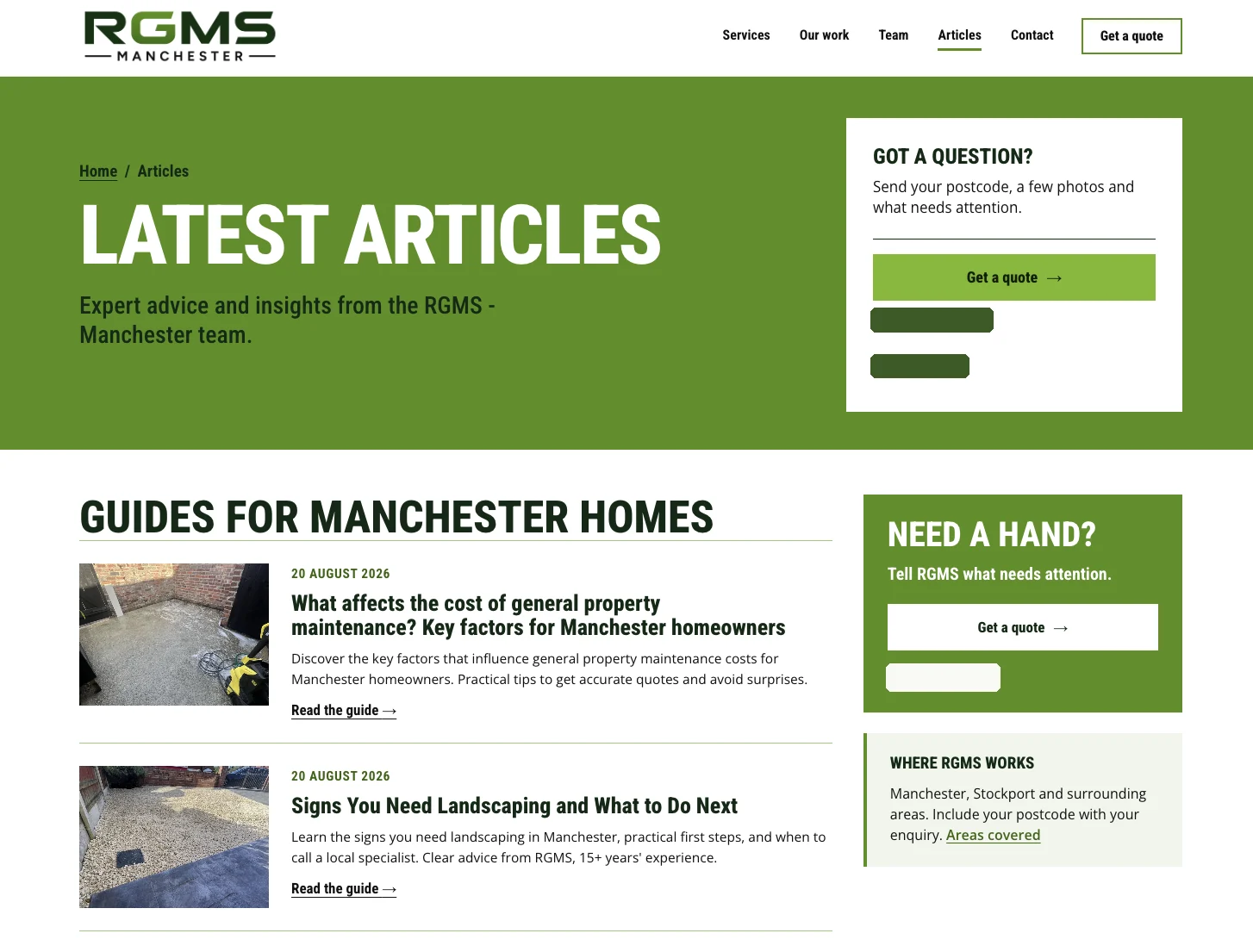
  • Service and area pages rebuilt. Every service and area page reworked so each one says what RGMS does and where, in words Google can match.
  • Measured, not claimed. Google Maps positions were recorded on a grid on day one, and re-checked the same way at fixed points.
rgms.uk/articles
RGMS articles page: guides for Manchester homes with article cards and a quote panel.Coming soon
The new articles hub, ready for the first run. Contact details covered.
05

Google Business Profile

For a local gardener, the Maps listing is often the first thing a customer sees. The profile had the basics and little else, so it was gone through line by line, and the Maps position for an agreed search is rechecked at weeks 4, 8 and 12.

RGMS got a one-page before and after sheet showing every setting, what we found and what it changed to, so nothing changed on their profile without them seeing it first.

SettingFoundChanged to
CategoriesGardener plus two extrasThree more that match real RGMS work
DescriptionOne lineEvery service and area, written for RGMS, approved by them
ServicesGoogle's generic listRGMS's ten real services, each described
Service areaTwo broad citiesNine named areas they actually work
Cover and photosNo cover, one month of photosBest finished garden, then 3 real job photos a week
PostsNoneTwo a month, each a real finished job
Review repliesNoneEvery review answered, then every new one
Website linkUntrackedTracked, so profile visits show up
A summary of the before and after sheet. The real one names every value.
And the rest

The parts you don't see, done properly.

The move from BUILT

RGMS cancelled, sent over their data export, and it was imported in one go: customers, jobs, quotes, invoices, price list and their regular visits, expanded into the new diary.

Email untouched

The domain was pointed at the new setup without touching RGMS's existing email. Customers never noticed a thing.

A photo library

Every job photo sorted by job and service, cleaned, renamed and sized for the web and for Google, ready for articles and weekly profile posts.

Privacy and terms

Rewritten to say exactly what the website and Office do with people's details, where the data is held and when it is deleted.

A launch check

The site is tested before handoff and again on the live address: speed on mobile, every redirect, keyboard use, contact routes and metadata.

A Maps target in writing

An agreed search in the area RGMS most wants work, measured from day one, with the result shown rather than claimed.

Support

A direct line to the person who built it.

RGMS don't get a ticket number or an account manager. They get Jacob, who built the website, the Office, the quote form and the search plan, on the phone or by message. If something needs changing, the person who answers is the person who changes it.

  1. 18 SepFirst conversation, about Google Maps
  2. 24 SepFull plan to leave the old platform
  3. 26 SepAgreement signed
  4. 27 SepWhole site mirrored, photo library started
  5. 29 SepBusiness data moved across
  6. 30 SepRGMS Office live on their own address
  7. OctNew website and the first articles
What they're on

Growth, plus a custom build.

RGMS are on Sitework's Growth plan, with RGMS Office built on top for them. In plain terms, here is what that gets them.

  • FoundA website, articles and a Google profile working on the searches that bring gardening work, measured against a written Maps target.
  • Enquiries that arrive readyA quote form people finish, with photos, landing in one place with a notification.
  • One place to run the businessDiary, jobs, quotes, invoices and customers in an app with their name on it.
  • Owned, not rentedTheir website from day one, their data exported automatically if they ever go.
Questions

About the RGMS build.

What did Sitework build for RGMS?

Five connected parts: a rebuilt 46-page website, a step-by-step quote form, RGMS Office (their own app for enquiries, diary, jobs, quotes and invoices), a weekly SEO publishing system and a full Google Business Profile overhaul. On top of that came the move off their old platform, a cleaned job-photo library and rewritten privacy and terms.

How did RGMS move from BUILT for Trades without losing anything?

The old site was mirrored page by page and checked against the live one, so every address Google had indexed still works. RGMS's data export from BUILT was imported in one go: customers, jobs, quotes, invoices, the price list and regular visits. Invoice numbers carry on from where they stopped, and their email was never touched.

Who owns the RGMS website and data?

RGMS do. The website is theirs from day one, not after a contract ends. If they ever leave Sitework, their Office data is exported for them automatically, without having to ask.

What is RGMS Office?

A business app built for RGMS with their name on it. It shows the day's visits on a map, takes in website enquiries with photos, runs a rolling year-long diary with repeat visits, and handles jobs, quotes customers accept online, invoices and a sales overview. It works on a phone, an iPad or a desktop.

How do website enquiries reach RGMS?

Straight to them. The quote form drops each finished enquiry into RGMS Office with the customer's photos and sends a notification to the phone. The phone number is on screen the whole time for anyone who would rather call. Nothing passes through Sitework.

Who do RGMS speak to when something needs changing?

Jacob, who built every part of it. There is no ticket queue or account manager, so the person who answers is the person who makes the change.

Why are parts of the screenshots covered?

To protect RGMS's customers and contact details. Customer names, addresses, map locations, reviewer names, phone numbers and email addresses are covered in every image on this page.

Can Sitework build the same for my business?

Yes. Every build starts with free mockups and a plan for what would win you the most work, whether that is a new website, better Google Maps rankings, an office app, or all of them.

Want this for your business?

Get my free diagnosis